This browser tool flags log-retention values below the requirements named in the description.

Try it freeFull version · $29 once →
What you get: every log store's retention across all YAML files in one Markdown table (value, minimum, clause) for your QSA or auditor.
Updated 2026-09-27 · ReadyStack
Flags log-retention values in Loki, CloudWatch, Elasticsearch ILM, S3 lifecycle and Kubernetes audit YAML that are shorter than PCI DSS 10.5.1, CERT-In 2022 or OMB M-21-31 require. Runs entirely in your browser — nothing is uploaded.
Same engine as the VS Code extension, byte for byte.
Free for the file open in your editor - no key, no limit. The workspace sweep and the report ask for a key.
VS Code MarketplaceOpen VSX (Cursor, VSCodium)npmext install ReadyStack.audit-log-retention-lint npx @readystack/audit-log-retention-lint <file>
Team? One key for every ReadyStack linter, 5 seats, $149 once
Workspace evidence report: every log store's retention across all YAML files in one Markdown table (value, minimum, clause) for your QSA or auditor.
One payment, one licence key for this tool. The key is shown right after payment.
One hour of a lawyer with 15 years' experience is $851 on the DOJ Fitzpatrick Matrix (billing year 2026).
Buy the full version — $29Need more than this one? ReadyStack Pass opens all 679 files and 561 full versions — $29/month or $199/year. See the Pass →
· ReadyStack
Real numbers from this tool, line by line.
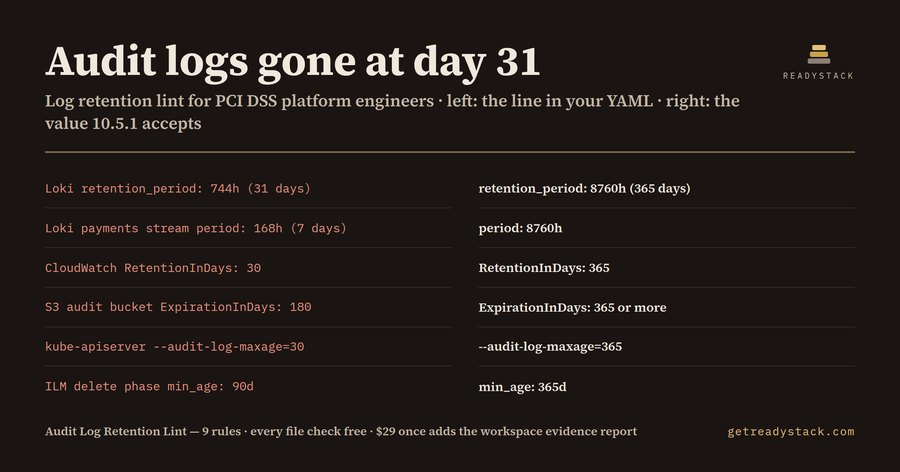
Audit logs gone at day 31: that is what a Loki retention_period of 744h means for a platform engineer whose cluster sits inside a PCI DSS scope, because Requirement 10.5.1 asks for at least 12 months of audit log history, with the most recent three months immediately available for analysis.
The number that decides this is rarely in a policy document. It is one line of YAML, often copied from an example, and it is written in a different unit in every tool. Loki counts hours (744h). Elasticsearch ILM counts days with a suffix (90d). CloudWatch RetentionInDays counts plain days. kube-apiserver takes --audit-log-maxage=30, also days. Nobody reads 744h and thinks "31 days" during a code review.
We wrote one sample file with the settings a payments team might ship: Loki, a CloudFormation log group, an S3 audit bucket, a kube-apiserver manifest and an ILM policy. Under PCI DSS the lint returns 7 findings, 6 errors and 1 warning:
The fixed file, with 8760h, 400 days and a 90-day archive transition, returns 0.
Why the rule you declare matters. The same YAML passes or fails depending on who you answer to. The lint knows three profiles. pci-dss applies PCI DSS v4.0.1 Requirement 10.5.1: 365 days total, 90 days immediately available. cert-in applies direction (iv) of the CERT-In Directions of 28 April 2022: logs of all ICT systems kept for a rolling 180 days, within Indian jurisdiction, so a log store in us-east-1 is a finding on its own. Failing to comply with a CERT-In direction can be punished under s.70B(7) of the IT Act with a fine up to ₹1,00,000 or imprisonment up to one year. m-21-31 applies OMB Memorandum M-21-31 for US federal systems: 12 months active storage plus 18 months cold storage, which the lint counts as 913 days total and 365 active. A CloudWatch group at RetentionInDays: 365 passes PCI DSS and fails M-21-31.
You declare the profile with one comment line at the top of the file, for example # log-retention: pci-dss, cert-in. When several are listed, the strictest minimum wins per check. With no line, PCI DSS applies.
Why not ask a chatbot? A chatbot can recite 10.5.1, but it does not open the YAML in your repository, and it has to convert 744h, 90d and a bare 30 correctly every time. The lint runs on every save, in the Problems panel, with the line number.
What it does not do: it reads configuration text only. A retention changed in a cloud console after deploy is not seen, and the lint does not decide whether a system is in scope.
The file check is free in VS Code and in the browser at getreadystack.com/tools/audit-log-retention-lint, with all 9 rules and no key. A licence key adds the workspace sweep, which walks every YAML file in the folder and writes one Markdown evidence table of file, line, value, minimum and clause, ready for the QSA or auditor.
It reads log-retention settings in YAML files, such as Loki retention_period, CloudWatch RetentionInDays, Elasticsearch ILM delete min_age, S3 lifecycle expiration and kube-apiserver --audit-log-maxage, and flags every value shorter than PCI DSS 10.5.1 (365 days, 90 immediately available), CERT-In 2022 (180 days in India) or OMB M-21-31 (913 days). Each finding gives the line, the clause and the value that passes.
Platform, DevOps and SRE engineers who keep logging configuration in YAML and answer to a PCI DSS assessment, the Indian CERT-In directions of April 2022, or US federal logging rules under OMB M-21-31. It suits teams preparing for a QSA visit or a CERT-In incident request who need to know which log store deletes evidence too early.
A chatbot does not open the YAML in your repository, and it often mixes up units: Loki writes 744h, ILM writes 90d, CloudWatch writes days. The rule is also different per regime: PCI DSS 10.5.1 wants 12 months, CERT-In wants 180 days kept within India, and M-21-31 wants 30 months. The lint converts each unit and applies the strictest declared rule.
Free: every finding in the open YAML file, in VS Code or in the browser, with clause and fix value, no key and no limit. The $29 licence, paid once, adds the workspace sweep: every YAML file in the folder checked at once and written into one Markdown evidence table of file, line, value, minimum and clause for a QSA or auditor.
One hour of a lawyer with 15 years' experience is $851 on the DOJ Fitzpatrick Matrix for billing year 2026. Under India's IT Act s.70B(7), failing to comply with a CERT-In direction can be punished with a fine up to ₹1,00,000 or imprisonment up to one year. The lint runs the retention check on every save at no cost.
A general AI chat answers from training data with a cutoff date, cannot read your repository and names no rule version. Audit Log Retention Lint (PCI DSS, CERT-In) checks the file you open against 9 rules from a rule set dated 2026-09-26, and points at the exact line with the fix. For a filing, an audit or a client you need that dated result on your own files.
One question, answered by the person who built it. Your email only if you want the answer sent.
Paste this code into your page. It runs in your visitor’s browser and stays up to date. Nothing your visitors type is stored.
For businesses: your name and logo instead of ours, and each visitor’s result + e-mail in your inbox (only when they tick consent) — Pro from $19/month. See Pro →
For a team or company: for an invoice with your company details, a quote or several licences, write to [email protected].
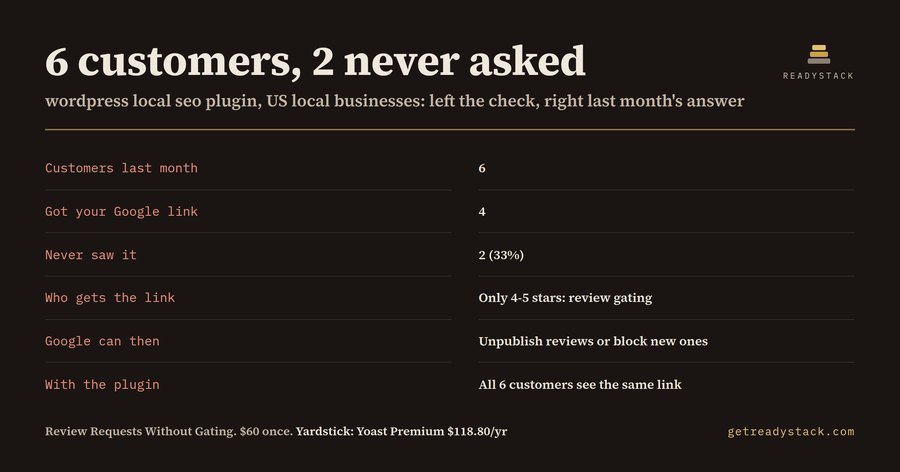
WordPress Local SEO Plugin: Review Requests Without GatingLocal SEO plugin for WordPress: check how many customers never saw your Google review link, then show every customer the same link. Google…FreeFull version $60
Xcode 26 GitHub Actions — check your build setup for freeApp Store Connect rejects uploads not built with Xcode 26 / iOS 26 SDK since 28 April 2026. See which Xcode each macOS job uses and the…FreeFull version $29ADA Title II Deadline Lint (WCAG 2.1 AA)Flags the ADA Title II and HHS Section 504 deadlines that both agencies reset in 2026, and the WCAG 2.1 Level AA failures your source code…Free
AI Model License check — check model licenses freeThis browser tool flags open-weight AI model IDs against licence clauses including domicile exclusions, user caps, non-commercial terms…FreeFull version $29Apple Privacy Manifest Guard for React NativeFlags every line that needs a PrivacyInfo.xcprivacy entry and names the exact Apple reason code, before App Store Connect answers with…Free
California Auto Renewal Law 2026 — check signup pages under californiaChecks subscription signup and pricing pages against California’s Automatic Renewal Law as amended by AB 2863, in force from January 1…FreeFull version $29ReadyStack
Calculators, templates and deadlines for the rules that change every year — free in your browser.