Need more? The full version adds what is listed under "What you get".
What you get: every project note you add lands on one Bases board that ranks all your projects by due date with burn %, time elapsed %, days left and projected overrun, plus a Blocked view, weekly status and…
For freelancers and agency PMs who quote a fixed fee or an hours estimate. Type one project's hours and dates. You see budget burned against time elapsed, the projected overrun if this pace holds, and a project note to paste into Obsidian.
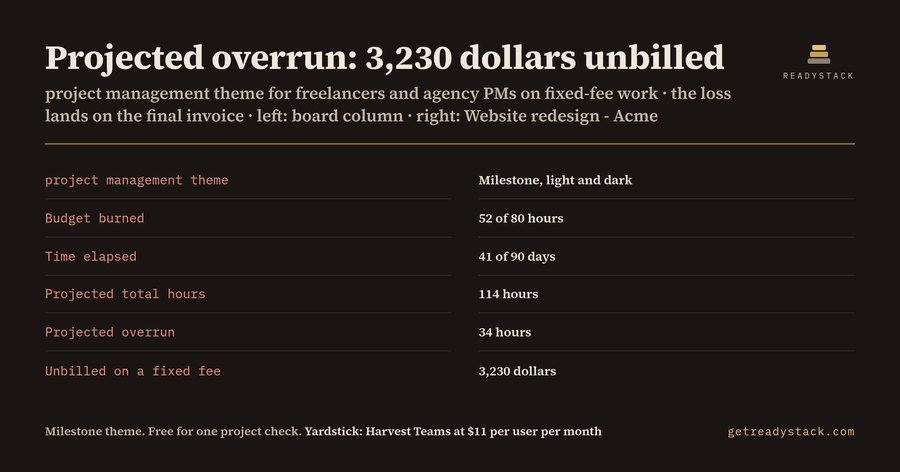
Projected overrun
34 hours
Unbilled on a fixed fee: 3,230 dollars
Budget burned 65%
Time elapsed 46%
Days gone / days in project
41 / 90
Projected total hours
114
Hours left in budget
28
Days left to due date
49
Status
over pace
Project note for Obsidian (paste into a new note in Projects/):
This page checks one project on one day. Hours keep moving. In the paid vault every note in Projects/ lands on one Bases board, Projects.base, with 3 views: Active board (sorted by due date, with Budget burned %, Time elapsed %, Days left, Projected overrun and Unbilled on a fixed fee), Blocked, and All projects.
Milestone theme, light and dark, plus 3 snippets (status-properties, done-tasks-dimmed, bases-zebra-rows)
Status tag colours: #status/active, #status/blocked, #status/on-hold, #status/done
Core Obsidian only: Properties, Templates, Bases. No community plugins.
Time trackers bill per seat each month (Harvest Teams: $11 per user per month billed monthly, TimeCamp pricing review, September 2026). This is one payment, not a subscription, and you can check your own project above before you pay.
Milestone theme: measured contrast
DarkBody text 14.63:1 Muted text 7.70:1 Accent 7.36:1 Sidebar text 13.42:1
LightBody text 15.74:1 Muted text 6.37:1 Accent 5.68:1 Sidebar text 14.29:1
Targets: 4.5:1 for body and sidebar text, 3:1 for muted text and accent, in both modes.
Install the vault
Unzip the download.
In Obsidian choose Open folder as vault and pick the unzipped folder. It opens with Milestone already on.
To use it inside an existing vault, copy the folder into that vault, then copy .obsidian/themes/Milestone and .obsidian/snippets into your vault's .obsidian folder.
Menu names can differ slightly by Obsidian version and interface language. Bases needs Obsidian 1.9 or later. No community plugins are needed.
Example result
Get the full version $29.90
The themed Obsidian vault: every project note you add lands on one Bases board that ranks all your projects by due date with burn %, time elapsed %, days left and projected overrun, plus a Blocked view, weekly status and client meeting templates, the Milestone theme (light and dark) and 3 snippets.
One payment, one licence key for this tool. The key is shown right after payment.
Harvest Teams time tracking: $11 per user per month billed monthly (TimeCamp pricing review, September 2026).
Need more than this one? ReadyStack Pass opens all 679 files and 561 full versions — $29/month or $199/year. See the Pass →
Questions people ask
What does this project management theme do?
It is an Obsidian vault of 13 files (9 notes, 3 templates, 1 Bases file) that opens with the Milestone theme on. Each project note holds client, status, billing, start, due, budget hours, hours used and rate. The board compares budget burned with time elapsed and shows the projected overrun in hours and, on a fixed fee, in dollars.
Who is it for?
Freelance consultants, designers, developers and small-agency project managers who quote fixed fees or estimated hours to clients and already keep notes in Obsidian. It suits people who want one place for briefs, decisions and hours, and who would rather see a project slipping in week 6 than find out at the invoice.
Why not use a free Obsidian theme?
Free themes change colours and fonts but do not track anything about your projects. This theme comes inside a vault whose Bases board recomputes budget burn against the calendar for every project note, flags blocked work, and ships weekly status and client meeting templates. Light and dark contrast is measured, not guessed.
What can I do for free?
On the free web page you type one project's budget hours, hours logged, start date, due date and hourly rate. It shows budget burned against time elapsed, the projected total hours, the overrun if the pace holds, its cost on a fixed fee, and a project note to paste into Obsidian. Both theme palettes and their contrast ratios are shown too.
How does the cost compare?
It is one payment of 29.90 dollars, not a subscription. For comparison, a TimeCamp review from September 2026 lists Harvest Teams time tracking at 11 dollars per user per month billed monthly. This vault does not replace a timer; it is the project board and theme around the hours you already log.
Ask about this tool
One question, answered by the person who built it. Your email only if you want the answer sent.
Embed this calculator on your site (free)
Paste this code into your page. It runs in your visitor’s browser and stays up to date. Nothing your visitors type is stored.
For businesses: your name and logo instead of ours, and each visitor’s result + e-mail in your inbox (only when they tick consent) — Pro from $19/month. See Pro →
Same job, next tool
Free in the browser. The full version is a one-time licence.
 SaaS UI Kit — AI disclosure check for your AI feature
 Cricut SVG — Teacher & School Staff SVG Bundle
 Count your stock on a phone. Close the shop on time.